Friday, 29 April 2016

Seo Services
SEO ( Search Engine Optimization) is a technique that promote your website on search engines and ensure to get relevant traffic & website rankings in major search engines – Google, Yahoo & Bing.

When someone queries a major Search Engine related to your site products or services, does YOUR name appear in the top 10 matches or is it your COMPETITION
If you are listed but not within the first 10 to 30 results you lose no matter how many search engines you submitted your site to. Ranking near the top on the major Search Engines is the real key to bringing free, targeted traffic to your Website.


Basically SEO Services is divided into three parts
SEO - Part A : Website Seo Optimization
SEO - Part B : Seo Analysis & Implemantation
SEO - Part C : Link Building - For higher PR
SEO - Part A
Website Optimization like title, description,keywords, Headline and tags
Keyword analysis
Keyword implementation according to content
Content optimization
Image Optimization, Image linking, Image alt tags, Text hyperlinking, Inbound & outbount link building
HTML & XML Sitemap building


SEO - Part B
SEO Ranking Reports
Keyword Research & Keyword Analysis Reports
Webpage Error checking like Broken linking Reports & other website error
Google Analytics Implimentation and Reporting
Competitors Keyword Ranking
Link Building Reports
Monthly SEO Performance Reports


SEO - Part C
Directory Submissions
Articles Submission
Link Exchange
Social Bookmarking
Press Releases Distribution
RSS Syndication
Yellow pages
Local Business Directories
Links from Blogs
Let us build an online website for your business in very cheap price. Website price always depend on the business type, delivered lines of code, time spent on design and we get this idea in telephonic meeting or by emails with client. The cost of designing and developing a website is generally measured in terms of person months of effort spent in design and development. We always draw a demo structure of website design in a paper after getting the client requirement, and then we insert these into the website development plan and calculate the price of website. Price is mostly depends on the main home page design and its re-design. A website price is more if its contains lots of banners, image effect, functionality and forms on the home page as compare to insert simple content on the home page with navigation for simple website. We are showing approximate prices of website design and development below. Expert Web World provides free web hosting and domain registration for first year with every website design and development order.

After website design you need to register your domain and web host to store the website files. You can also reserve the domain and web hosting before starting the website design procedure. Always add the keywords related to your business name and type in domain name. Its easy for the visitor to remember the domain name and business name. See the below website hosting prices.
Visit Our  Official Site to know more about us: 
click the link:KreativeKoders

Why a Website is Important for your Business

website importance for businessA simple question, What is a website? In its bare form a website is a single domain that consists of different web pages. We should all know that by now, but surprisingly what we don’t all know, is the benefits a website can provide for your business and its shocking to witness how many business don’t actually have a website or online presence!
If you have a business and don’t have a website, you are losing out on great opportunities for your business. A website itself can be used to accomplish many different marketing strategies to help your business grow.
As a business owner, you need to know where your consumers are. But what if consumers know your business and what you can offer, but they can’t reach you? That is one of the risks you take by not having a website for your business.
What are some other benefits of having a business website?
Cost Effective
You know exactly how much your website is going to cost you and its on goings – a brick and mortar store on the other hand is susceptible to many out of the ordinary occurrences which could blow out the costs such as leaving the lights on, theft, damage, extra staff etc.
A strategically developed website and online presence solution provides tremendous benefits and costing outlines.
Accessible around the clock
Your website and social media accounts are accessible 24/7/365. Imagine that you want to buy from a store. You put in all the effort required to go to the store, but when you get there, it’s closed. We all know how irate we feel in that situation. You’ll think twice about going back given the bad taste its left (ok might have been your fault for not checking but hey, this is proving the point here!). You will just find another store that is more easily accessible.
Since your website is operational around the clock, from the convenience of the local coffee shop, their couch or their bed, your customers and clients can easily access your website and services.
Convenient
What is more convenient: driving outside to look for different stores that are available to shop in, or sitting in the comfort of your own home and shopping for the products you’re looking for? Pretty obvious answer, unless you like aimlessly driving around. Smart businesses realise this and thus have their own website housing their products and services so that potential customers can browse online for the products they want to purchase.
Credibility
By building a website you are giving your business the opportunity to tell consumers why they should trust you and the testimonials and facts to back up those opportunities. Believe it or not, most people will search the internet for a product or service before the purchase to check the credibility first. When you provide good service or product, positive word-of-mouth about your business is likely to spread. Which in turn, delivers more repeat and new business.
People tend to trust a business after they have done business with it. Using your website, you can continuously serve consumers online and increase your credibility as a business owner.
Sales
Without sales, or selling more than you spend, your business is doomed. By having an online presence you allow for the sale of your products or services around the clock to whoever whenever with no or hardly any limitations; Unless you run out of stock or overworked, but thats a good problem to have right! Giving your business the online presence it deserves is crucial to your brand and accountants smile.
In short, being visible worldwide means you are very likely to gain more customers. The more customers and visitors you have, the more sales you will generate. The more sales you generate the happier you and your shareholders will be!
Marketing
Having a website and online presence strategy allows you to market your business online. There are lots of marketing strategies you can use to advertise and market your business. All online marketing strategies have been proven to be effective. Which ones you choose depends on the type of business you are in. Speak to us to see which are best for your business.
Bottom Line 
It is imperative for every business to have a website. The more professional your website is, the more advantages you can gain. 

SEO Disasters: Preventing The Unthinkable

Is your site suffering from a sudden drop in traffic? Columnist Mark Munroe notes that most SEO issues are preventable and shares his process for keeping these issues at a minimum.


think-problem-solution-work-ss-1920
Like any SEO veteran, I can recount my share of horror stories — launching Google Analytics and noticing that sudden, sickening drop in traffic.
Sometimes, sudden drops in traffic may be the result of an algorithm changes (such as Panda). However, in many cases, they are caused by bugs, inadvertent changes or overambitious engineers with a little bit of SEO knowledge.
In this article, I will examine three real-life case studies and outline the steps necessary for SEO disaster prevention.

Case #1: “Something Bad Is Happening To My Website.”

I was at a company offsite, and my phone had been vibrating with several calls. I left my meeting and saw that my good friend (let’s call him “Tony”) had called several times and left a message: “I think something bad happening to my website. Traffic is crashing. Some sort of SEO problem.”
Tony runs iFly, an extremely successful airport information site. Like many of us, he is very dependent on Google traffic; an SEO issue would be a big problem, indeed.
To give you an idea of how bad “something bad” was, look at this drop:
Ifly
Murphy’s Law: “Anything that can go wrong will go wrong.
“You found what on my site?”
When I first got the call from Tony, I suspected Panda because an update to the algorithm had just been released. Fortunately for Tony and iFly, it was not a Panda event.
The first thing I noticed was that the traffic drop impacted organic search traffic from both Googleand Bing. That was great news, as it implied a technical problem. I took a look at the source, and lo and behold:
<meta name=”robots” content=”noindex“>
In the iFly case, there was a tiny bug that resulted in the meta tag above being inserted into every page in the site. This one line of code was the cause of all his troubles. Essentially, it told Google and Bing to ignore every page of his site. They obliged.

Case #2: “Our Traffic Seems Soft.”

Early in my career, I ran product management for a site called RealTravel. You won’t find it online anymore — it was sold to Groupon and eventually shut down.
One morning, I arrived at work and got ready for my usual daily kickoff of coffee and Google Analytics. Our CEO came over with a worried look on his face.
“Our traffic seems kind of soft, can you see what’s going on?” We had been on a traffic upswing.
I generally open my Google Analytics reports with optimistic anticipation. That day, though, I had a sense of dread. Sure enough, we were down about 20 percentage points. It was a kick right in the gut.
The next day, we dropped a bit more, and then even more. Within a couple of weeks, we were down about 30 percent. This was a time when we needed to show traffic and go for funding. It’s hard to get funding when your traffic does this:
RealTravel traffic drop chart
Smith’s Law: “Murphy was an optimist.”
“Sorry, I made a server configuration change.”
Over the next week or so, I scoured our site, our rankings, Webmaster Tools, and our backlink reports to try to figure out what was going on.
I couldn’t initially imagine that it was related to changes we’d made a year earlier when we had gone through a site re-architecture. We had handled things correctly. We’d put in 301 redirects as Google recommends, mapping the old content to the new content. Things had gone swimmingly after the relaunch. In fact, traffic had shown a steady increase. A year later, I was not considering the site architecture as the potential cause. So naive…
A couple of weeks into the problem, I noticed that some old URLs were giving 404 errors in Google Webmaster Tools.
I started checking more of the old URLs and saw that many of them were 404-ing. My engineer looked into it and told me, apologetically, that he had made a configuration change that broke the redirects. Yikes! We had lost the value of all our historic deep links, and our domain authority had suffered.
Traffic eventually came back, but it was serious damage to a struggling startup.
Broken redirects: a nasty problem
There are lots of very valid reasons to change URLs. In our case, the new site architecture required it. Other reasons include:
  • Including the primary keyword in the URL.
  • Removing URL parameters.
  • Creating user-friendly URLs.
  • Changing the folder structure.
  • Moving to a new domain.
  • Switching to HTTPS (yes, those are different URLs).
  • Normalizing on a domain name with or without “www.”
While the way to handle redirects is well known (the use of 301 redirects) and most SEOs will get them set up correctly, their usage creates a dangerous vulnerability if you have strong external links going into the old URLs. It hit RealTravel severely.
Any problems immediately after the change are quite obvious. Google would still have the old URLs in the index, and clicking on the results would lead to 404s, so you would see no traffic coming into the new pages.
However, when it happens well after the fact, it is a particularly insidious problem. The site still works fine. Google’s index contains the new URLs, so click-throughs from the SERP work fine. You might notice a traffic drop in referral traffic, but for most sites, that is insignificant. You only notice a problem if you happen to click on a link from an external site.
Eventually, you will see the 404s in the Google Search Console crawl error report. However, there is a lag there, and by the time you notice these 404s, a good deal of the damage may have been done. Worst of all, if it’s only a few high-value URLs, you might not even notice.
I learned my lesson. Now, any time I do a URL change or site move since, I insist on monitoring the redirects with test scripts, forever. Very, very few sites have a policy like this.

Case #3: “We Think Bing Has Hurt Our Google SEO.” 

I joined a large consumer top 100 US website to manage the SEO team. This is one of the most visible sites on the Web, one that you would surely know.
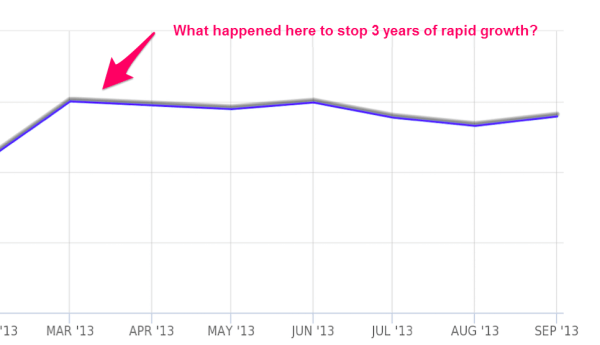
After years of hockey-stick growth, they had a sudden flattening of traffic over the previous six months. The director of product management told me something had been wrong with SEO.
They were pretty sure they’d identified the problem and believed that Bing was the cause. Bing had started crawling the site at an incredible pace, which had bogged down the servers (they had dedicated servers for the crawlers). In their estimation, the server response time had degraded such that Google was crawling fewer pages.
It was a good theory, and they had pretty much settled on it. Still, even after they had resolved this issue, traffic had not bounced back. The idea of  blaming Bing for a Google problem was a good story. I found the irony quite amusing.
I wasn’t quite buying it. This was not definitive enough for me. I wanted to dig in, so I did.
Like many development teams these days, they had an agile website, with bi-weekly releases and frequent patches. I asked for a history of changes so I could get a handle on potential causes for the traffic drop. I was provided a bunch of cryptic engineering release notes from three or four of the website updates over that six-month period.  Lots of stuff had changed, but nobody knew what, beyond a couple of major features.
I can’t show actual traffic numbers, but SimilarWeb highlights when the apparent problem surfaced.
traffic-flat-mm
Munroe’s Law: “With SEO, whatever can break, will break. Whatever can’t possibly break will also break.”
The Missing Links
This one was tricky to detect. They had actually introduced a bug six months earlier that was obscure and far from obvious.
The site was dependent on long-tail traffic from a specific type of content that was only crawlable via a deep HTML sitemap. The bug removed about half the content from these sitemaps. This issue went undetected for so long because HTML sitemaps are rarely visited pages.
Even so, the pages were not broken. The only way to detect his problem would have been to audit the links on these pages vs. the content that should be generated on those pages (which is how I detected the problem).

More Gotchas 

With the increasing technical complexity of websites and SEO, there is a huge list of potential issues which can affect traffic and rankings. At SEORadar (my company), some of the issues we have come across include:
  • Rel=canonicals. A common problem is broken or accidental removal of the rel=”canonical” link element, which specifies the canonical page among those which have duplicate content. Rel=canonical problems abound, as many pages have logic to determine whether to put on a self-referential rel=canonical or legitimately point to another URL.
  • Nofollow links. We’ve come across sites with “nofollow” link tags for all the links on a home page. In one case, all the paginated links on a blog were nofollowed, preventing multi-paged posts from getting link equity.
  • Meta Robots. We’ve seen the nofollow, as well as the noindex meta tags, on pages where they did not belong. We’ve also seen noindex removed inadvertently, which led to Google’s index getting flooded with low-quality pages.
  • Robots.txt. Sometimes, websites inadvertently configure their robots.txt file to block pages and or resources (blocking CSS can be a major mobile SEO issue).
  • 301 redirects. The most common 301 redirect issues involve accidentally removing redirects or morphing 301s into 302s.
  • Page titles. We’ve seen these getting accidentally wiped out or set to the domain name.
  • H1 tags. Issues often arise when <h1> tags lose keywords and/or get deleted from the page.
  • AJAX sites. Sometimes, websites using AJAX serve the wrong content to the search engine spiders. (This is particularly nasty, since spiders get their own distinct version of the page, and you need to regularly look at what the spider is getting served.)
  • Hreflang. The hreflang tag, which allows you to specify which version of a page should be served based on the user’s language or region, sometimes gets deleted.
  • Footer and Navigation links. Problems arise when links to important content are deleted.
  • Cross-links. Cross-link to important content might be removed, diminishing that content’s authority.
  • Meta Descriptions. Issues arise when the same meta description is posted to every page on the site or getting deleted.

Reality Is Stranger Than Fiction

Some cases are so strange that you would have trouble believing it:
  • Imagine a site that has built a nice, friendly m.dot implementation. However, the mobile crawler was not seeing this site. Apparently, there was some old cloaking code that served up the old “dumb” phone/feature phone version of the site to the spiders. Yes, they went to the trouble of building a great mobile site and hid it from the spiders.
  • Another site, a software service, had an opt-out page to cancel their service. Somehow, an entire content section of the site had rel=”canonical” links pointing back to the opt-out page (ironically strengthening the one page on the site they did not want users to actually see).
  • On one site we looked at, there was some cloaking logic serving bad rel=canonicals to the crawler. If you looked at the page source from your browser, the rel=canonicals looked fine. To catch this, you had to compare the rel=canonicals in Google’s cache to what was on the user’s page.
You can’t make this stuff up!

Why Do So Many Things Break?

How can these things possibly happen?
  • Complexity and “if” statements. Consider the meta robots “noindex” tag:
    • Some content you may want indexed, and some you may not. In that case, there is often logic that is executed to determine whether or not to insert the “noindex” tag. Any time there is logic and “if” statements, you run a risk of a bug.
    • Typically, sites have staging environments or subdomains they don’t want to be indexed. In this case, logic is needed to detect the environment — another opportunity for a bug if that logic gets pushed live.
    • Sometimes, developers copy templates to build a new page. That old template may have had a noindex.
  • Frequent releases. Most websites have at least weekly updates, as well as patch releases. Every update presents a risk.
  • CMS updates. Manual updates to content via CMS can completely de-optimize a page. For sites that use WordPress, it is very easy to accidentally noindex a page if you use the Yoast plugin. In fact, I know one very prominent site that noindexed their most visited blog post.
  • Competing interests. Many hands with competing interests all have the potential to muck up your SEO. Whether it’s designers deleting some important text, product managers deleting navigation, or engineers using AJAX and hiding important content, the risk is ever-present that something can go wrong.

What Happened To My Site?

Most websites do not have a good handle on what updates and changes have been made to their website (and when). Sure, there might be some well-written release notes (although cryptic seems more common), but that won’t tell you exactly what changed on a page.
How can you research a traffic drop if you don’t know what has changed? The current modus operandi is to go to the Internet Archive and hope they have a version of the page you are interested in.
This is not just an SEO issue. It impacts conversion, monetization, UX metrics — in fact, all website KPIs. How can you understand what’s causing a shift in your KPIs if you don’t know exactly what changed and when?

SEO Testing

SEO testing is also a big problem.
Let’s say there are 10 important page templates for a site and 20 things you want to verify on each page template. That’s 200 verifications you must do with every release.
These tests are not black and white.  The existing of a no-index tag on a page is not necessarily a problem. Just because a page has a title, doesn’t mean it has the right title and it hasn’t changed.   Just because there is a rel canonical, doesn’t mean it is linking to the right destination.  It’s easy to write a test script to tell you that a title is missing.  It is difficult to tell the title has had it’s keywords removed.

Gaining Control

Murphy’s First Corollary: “Left to themselves, things tend to go from bad to worse.” 
… so they can’t be left to themselves.
I’ve painted a pretty scary picture here. SEO is fragile. I am sure many sites have lost traffic with no clue that they are the victims of a preventable problem.
Every SEO needs to have tools and processes in place to prevent these mishaps, and implement education programs, so that every part of an enterprise (large or small) understands what can impact SEO.
Audit
You can use an audit to get a good baseline of your site. While it won’t tell you whether a title has been changed and important keywords lost, you can use it to make sure there are no problems with the current state of the site.
All the major enterprise platforms provide some audit capabilities, and you can supplement this with tools like MozRaven and Screaming Frog.
If you have a good handle of the current state of your site, then life becomes easier; you can focus on looking at changes when new releases are pushed. However, an audit is just the starting point.
Change Monitoring
Whenever a new version of your site is pushed live — or better yet, is still in staging — the most critical thing to do is a change analysis.
If you know (from your audit) that the site was in a good state before the push, then just looking for changes will minimize your work. You only need to take a close look at things that have changed to validate that nothing has broken.
It’s best to use something that monitors and alerts you to change and potential problems. For that, I recommend:
  • SEORadar (disclaimer: this is the company I founded). It is focused explicitly on monitoring changes and generating alerts. You can get a fair amount of protection with the free version, which includes redirect monitoring if you have changed URLs.
  • RioSEO. This is the only other extensive change monitoring system focused on SEO that I know of.  It’s contained within their enterprise platform.
  • In-house developed tools and scripts. Some companies prefer to develop their own test and monitoring solutions.
  • Robotto. Somewhat limited, but still useful. It monitors for robots.txt changes and basic HTTP redirect tests.
  • Manual process. If you maintain a regular archive of your pages, you can set up a manual process. You will need this to analyze changes, and this will be invaluable if you need to troubleshoot SEO or other site issues. For instance, you can do this by saving audits run with Screaming Frog.
  • The Internet Archive. This is another possibility for an archive; however, it is hit or miss on whether it will have the page you are looking for.
What Pages Should You Monitor?
  • Page templates or page types that generate significant traffic. For instance, on an e-commerce site, that would include product pages, category pages and brand pages. Generally, these pages are generated algorithmically off of the same page template, so monitoring a few instances of each page type should suffice.
  • Pages that are important for indexing (HTML sitemaps, indexes and other pages that play a major role in getting content indexed, even if they don’t generate much traffic.
  • The home page.
  • Individual content pieces or blog posts that generate significant traffic or are otherwise important strategically.
Links, Links… Precious Links
Links are more precious than ever in 2015. Imagine that a simple, hard-to-detect server configuration issue could negate the value of many of your deep links (and all that PR and branding you did to get those links)?
Don’t let a server configuration problem damage your domain authority, as in the case of RealTravel. If you have changed your URLs (or even switched to HTTPS), you want to know that those redirects are always in place. You need to monitor those links forever and ever. Either write custom scripts or use an app/software that monitors your old URLs.
Education
With SEO, you will be in a state of perpetual education and training. You want everyone on your team protecting and preserving your website’s SEO. They have to know the risks and potential consequences of various changes to the site.
To achieve that, you need to focus on education by doing the following:
  • Periodic training with  product managers, engineers and quality assurance.
  • Push as much testing as possible over to QA. Provide them with a checklist for their verification process. However, do not depend on it. If something breaks, all eyes will be on SEO.
  • While company-wide training is good, individual training with each team is important, as well. It is more personalized and helps get buy-in and commitment.
  • Provide backup material and cheat sheets describing all the on-page elements of importance.
  • Over-communicate whenever some sort of SEO discussion comes up. Always explain the “why.” What is second nature to you is going to be very slow to register with people who are not involved with SEO. People just won’t get it from sitting through a single PowerPoint presentation — it takes repetition.
Process
SEOs shouldn’t fully depend on other teams to maintain a website’s SEO. We must be proactive, as well, by developing a process for monitoring and identifying site changes, and we must make this process a habit.
  • Know what changes are being made to your website. Attend product meetings.
  • Have a review with your QA team to quickly highlight potential problem areas in each new release to help them understand where they should focus.
  • Repeat SEO training sessions on a regular schedule. Make sure new employees get indoctrinated.
  • Test the site before a release goes out.
  • Test again after the release goes out.

Control The Controllable 

Search engine optimization, particularly in-house SEO, is incredibly stressful. We have to control the uncontrollable and predict the unpredictable.

A Beginner’s Guide to Google AdSense


Sure, affiliate marketing is an excellent way to monetize a web site or blog. It has the amazing benefit of not requiring stock, and in many cases it’s a set and forget strategy. Often though, many affiliates, including myself, will also run Google AdSense on their web sites.
Adsense is a nice alternative, or complimentary monetization strategy to affiliate marketing.

My income increases when using AdSense – my affiliate sales are unaffected

It used to be that I was afraid to “lose customers” when implementing Google AdSense on my affiliate sites, because when they click the AdSense ads they leave the web site. But test after test showed me that implementing AdSense often did not have any negative effect on affiliate commissions.
So, really all it did was boost my income and allowed me to distribute risk by having more than just one monetization strategy.

AdSense ads run in designated areas on your web site – advertisers pay Google to run ads there – but you get a cut

Many people still ask the question: what is Google AdSense, and how do I get started?
I am in the position where I run a multi-author WordPress news web site and one of the attractions is that we allow authors to include AdSense on their articles. Many though, it turns out, do not know what AdSense is and don’t know how to get setup.
First, let me explain as simply as possible what AdSense is. When advertisers pay Google to run ads (with the Google AdWords program), if they opt to show their ads on Google’s Display Network, then their ads will show up in the “AdSense slots” on participating web sites.
In many cases, the owner of the web site “owns” (in a sense) all of the Google AdSense ad slots. In the case of a multi-author web site, it could be that the owner allows a sharing of revenue. In that case, there could be several publisher AdSense as slots being displayed on a given web site.

You must “own” the web site used during the Google AdSense application process – but could run ads on other sites after acceptance

It used to be that you could submit an application to become an AdSense publisher, enter “any old web site” and in most cases get approved, ready to run ads on any other site of your choosing. Nowadays though, as I discovered, Google now has a second level of verification, complicating things a little more. The publisher must now prove that they own the web site that they intend to run ads on.
When I say “own the web site” that is sort of a loose statement. Many times, as long as the publisher has the ability to create AdSense ads (either through direct code access, or some sort of widget) he or she could make it through the second stage of AdSense approval. That’s not always the case though. Having the ability to add AdSense code to a web site doesn’t necessarily qualify you as the “owner.” And Google’s recent(ish) requirement is that the publisher must own the domain of the web site that they use during the application process. It’s only after approval where the publisher can run ads on different web sites.
If you know someone that owns a web site and will let you “piggyback” you *may* get through the application process. But after awhile, Google stops allowing certain domain names to be used during the application process. Because like I said, technically you must own the domain. It seems the goal is to have at least one web site for every AdSense publisher, and this is the way they attempt to make that happen.

Buy a cheap domain name and attach it to a free web site creation service and you qualify

Fortunately, it’s quite simple these days to “own your own domain name” and create your own web site. And this doesn’t have to be expensive either. You don’t really have to go the route of getting your own hosting and getting a web site built (although that can be super cheap, especially when using WordPress). Realistically you can get a domain for $10-$15 (for the year) through Namecheap.com and build a free web site on Weebly.com (for example), attach your newly bought domain name to your newly created web site, and then you comply to the main rule of requiring your own domain name.
Be careful though when choosing a service. Some free web site tools, while they might allow you to attach a domain name to your site, you may not be able to run AdSense. WordPress.com hosted sites is an example of one where you cannot run AdSense ads. To keep it simple and cheap, I would suggest buying a domain from NameCheap, then setting up a quick free site with Weebly.com.
From there, publish really awesome, high value, content on your new site. Aim for about 6-20 really good articles before applying. Be sure to include a contact and about page for a better chance of getting accepted.
Fortunately you can re-apply to AdSense if ever rejected. Follow the advice Google gives if you get rejected, then re-apply. If you applied with a domain that you can’t add AdSense code too, you still have the chance to re-apply with a different domain name/web site.

What types of ads show up in the ad slots, and how do I generate income from it?

Now, for those of you that are curious, and would like to know about what types of ads show up in the AdSense slots, I will cover that now.
Keep in mind that you are giving control of a certain portion of your web site to Google to do what it pleases. You have some control over appearance, size, etc. plus you have the ability to block ads. And you can decide if the ads are text, images or animated. There may be other kinds as well.
Now, as for what ads show up. There are a few different things that can happen. First, the traditional way is… Google will determine what the content surrounding the ad slot is about, and display a related ad. Another way is… Google will follow a visitor from site to site (using what are called cookies) and then run ads attempting to get those visitors *back* to a previously visited site. This is often called retargeting, and only happens when the owner of the previously visited site has paid to run retargeting-style ads on the Display Network. The final way is for advertisers to run ads in very specific ad slots, on very specific web pages, on very specific web sites. There may also be other ways. These are the only three that I am aware of.
Oh, and a key piece of information that I should have mentioned earlier on… you get paid when people click your ads (don’t click your own! Google will know) and you may get paid per impression (or multiple impressions) in some cases. I don’t know for certain. I just know that Google AdWords advertisers have the ability to choose a pay per click or pay per 1,000 impressions model when running their ads, but to my knowledge, the revenue share for AdSense follows just a pay-per-click model.

As far as I know, Google AdSense tracking is lacking

Tracking the performance of your AdSense ads is very limited. I haven’t looked too deep into tracking methods lately, so it may have improved, so take this information with a grain of salt (or whatever that saying is that doesn’t make much sense). In general, you create an “ad channel” and that will help you determine the performance of the ad (or ads) *attached” to that channel. Many sites allow you to embed AdSense in templates or widgets so usually the same ad is used on the entire site. Therefore, tracking on the site level is often what occurs. But, folks will often track on the ad slot/web site level as well.
You could get clever and manually create an ad and ad channel for every page on your site. This could get very cumbersome. There’s got to be a better way, and there probably is. I won’t research it now though, this is just an “intro” article after all.

Applying for an AdSense publisher account – use your Gmail account!

Now, to apply you will need to have your web site setup already (with your own domain name and content!). Then, using your Google account (i.e. Gmail or YouTube account) go through the app process.
After Google peeps at your site, it will let you know if it qualifies or not. If so, you just have to place your code. The code will initially be blank after placement on your site. Once an ad shows up, you know that your account is active. After your account is active you can create new ads to run on other sites
The app process could take anywhere from one day to a couple of weeks or longer. Just be patient and wait it out. Google sends emails through each phase so you will know where you’re at. If you don’t see an email for quite awhile it may have got lost. That happens. Have a peek in your AdSense account and you will see messages across the top indicating where you’re at in the process.

10 Sites to Find Free Graphic Design Courses Online

Free online courses in graphic design are offered by real schools. Learn which graphic design courses are available, what topics they cover and which ones lead to real college credit.

Online Course Info and Requirements

Graphic design tutorials are typically found on designer websites and through blogs; however, some colleges may offer graphic design courses online. Colleges and universities offering courses typically do not offer credit, and students may need to have access to specific software, such as Adobe Flash, Illustrator or Photoshop, to get the full benefit of the tutorial.

African Virtual University

One of the schools listed in the Open Courseware Consortium, African Virtual University offers a course that provides an overview of graphic tools. Multimedia Design and Applications is available in a full module and offers further readings. The course examines digital resources, web design and 3D objects.

About.com

About.com offers a variety of free lessons on graphic design. Graphic Design Basics teaches users the fundamentals of graphic design by demonstrating the elements and principles of the field through two basic classes. Introduction to the Elements of Design teaches users about shapes, lines, texture, mass and color. Within the course, students will create a folder of design samples to use throughout the individual lessons.

Absolute Cross

Absolute Cross offers users free tutorials on graphic design and Photoshop. How to Use Drupal's Contemplate Module requires users to download a module before beginning the tutorial focused on learning how to detail aspects of HTML code. Within the Typewriter tutorial, students will learn to use Adobe Flash to create an animated graphic typewriter effect without using Actionscripts.

Palomar College

Independent learners at Palomar have access to lessons, examples and projects. Users will learn through the completion of projects and will have access to student work to use for examples. The Design and Compositionprogram is broken down into five different parts. Topics include color, the design process, symmetry and linear perspective.

Planet Photoshop

Planet Photoshop offers various tutorials and videos to users for free on a variety of subjects related to Photoshop. Long Exposure Slap Zoom Effect is focused on creating a zoom effect for images using Photoshop. This tutorial takes users through a step-by-step process of creating this visual effect. Proper use of the pen tool is the focus of the Your Pen Tool tutorial. Learners receive instruction on using the pen tool to create various shapes.

Massachusetts Institute of Technology

For this course, MIT offers lecture notes, exams and assignments with no solutions. The Computer Graphicscourse includes 23 lectures that are offered in PDF format. The course covers topics like transformations, animation and color effects.

University of California - Berkeley

The UC - Berkeley offers a wealth of digital media tutorials through the KDMC. These free tutorials feature several lessons. CSS Layout with HTML5 trains learners to structure a document and create gradients and floating images; the tutorial also explores typography on the web. Multimedia Storytelling examines concepts in storyboarding and editing, along with using video and graphics. In Building Flash Templates, learners complete 11 different lessons examining topics in background creation, button editing, sections and setup.

W3schools.com

W3schools.com instructs users on the basics of HTML through a variety of web tutorials that offer several different lessons. Course materials for HTML Tutorial include quizzes, references and exams. Within the tutorial, students explore concepts in formatting, blocks, layouts, elements and links.

Web Design from Scratch

Web Design from Scratch offers free tips and tutorials to use to design more efficient websites. How to Learn Web Design goes over the essentials of learning how to design a web page and offers resources users can use to learn more. What is the Relationship Between Graphic Design and Web Design? describes what makes an effective website while teaching visitors the difference between graphic design and web design.

Youthedesigner.com

Youthedesigner.com offers free online graphic designer tutorials that feature a variety of lessons and step-by-step instructions. Adobe InDesign Tutorials for Beginners includes 11 lessons covering type, frames, graphics and layouts. The 5 Amazing Vector Portrait Tutorials! course demonstrates how to create vector portraits using a variety of styles, such as geometric styles, textured effects and layering, using Adobe Illustrator software.

Kreativekoders.com

Kreativekoders is a web designing based in kurnool. We are experts in SEO services, Web designing, Graphic designing, Web development in kurnool.
We do free websites for Temples, Charities, Church, Mosque

Followers

Popular Posts

Blog Archive